
WeSendit Storage or ALPS: Choosing the Right Storage Provider
💡 Good to know: Both options come with military-grade encryption by default. Your data is secure regardless of which provider you choose.
1. The Two Options at a Glance
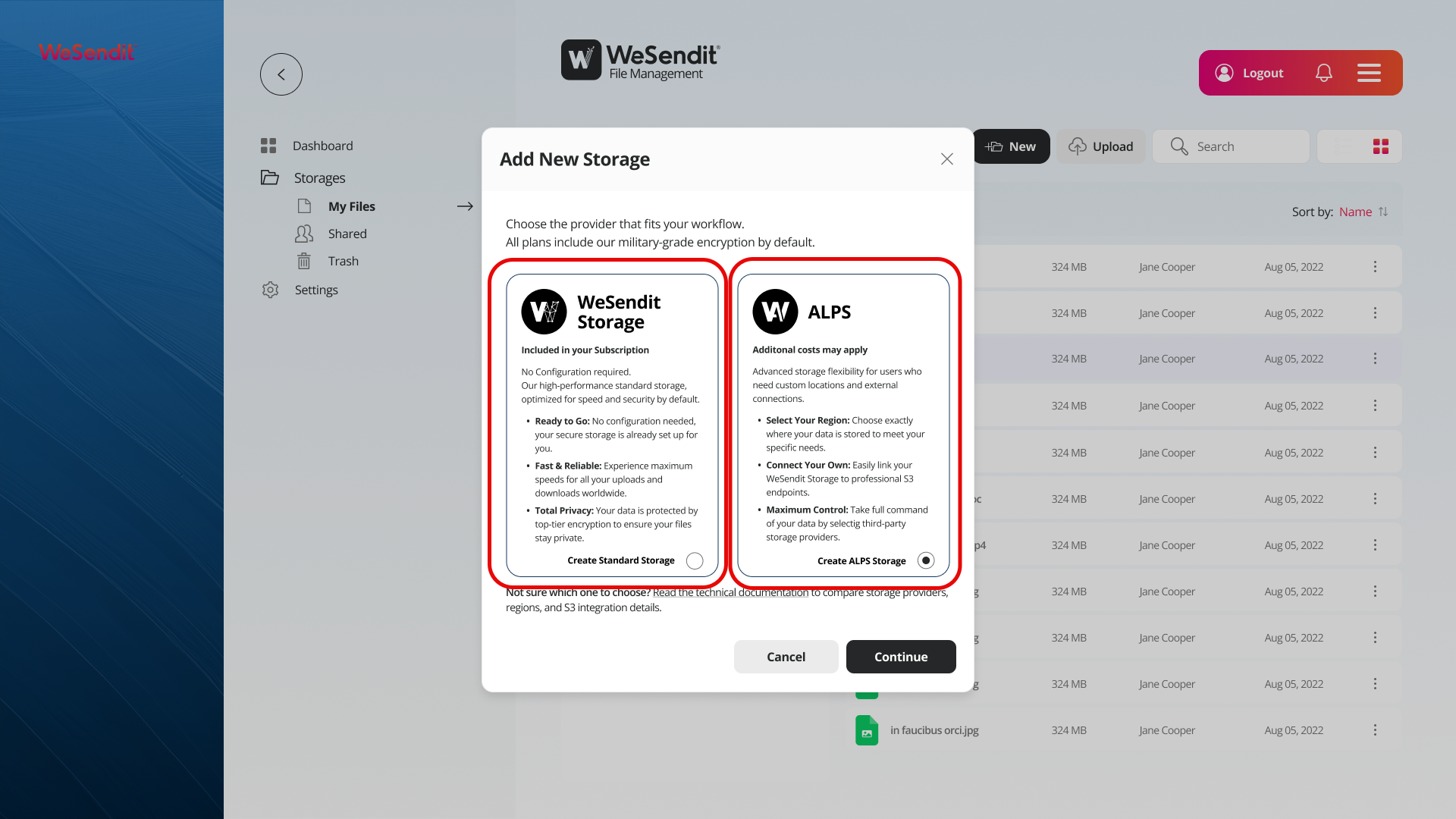
WeSendit Storage – Simple & Ready to Go
WeSendit Storage is the default option and is included in your subscription. No configuration needed — your secure storage is set up and ready to use immediately.
Ideal for you if you:
- Want to get started quickly without any technical effort
- Have no specific requirements for server location or external tools
- Are looking for a reliable, high-performance solution for uploads and downloads
ALPS – Maximum Control for Advanced Users
ALPS stands for Advanced Location and Provider Settings and is designed for users who need more control over their infrastructure.
Ideal for you if you:
- Want to choose exactly where your data is stored
- Need to access your data via external tools or custom applications using the S3 API
- Want to connect your own cloud provider (e.g. AWS)
⚠️ Note: With ALPS, additional costs may apply depending on the selected region and configuration these are not included in your base subscription.
2. Feature Comparison
Feature | WeSendit Storage | ALPS |
|---|---|---|
Included in subscription | ✅ Yes | ⚠️ Depends on usage |
Configuration required | ❌ No | ✅ Yes |
Choose server location | ❌ No | ✅ Yes |
S3 API credentials | Optional (can be added later) | ✅ Yes (at creation) |
Connect own storage provider | ❌ No | ✅ Yes |
Military-grade encryption | ✅ By default | ✅ By default |
Suitable for beginners | ✅ Yes | ✅ Yes |
3. Available Regions
WeSendit Storage
The server location is automatically selected by WeSendit and optimized for high performance and availability. You don't need to do anything.
ALPS
With ALPS, you can specify exactly where your data is stored. Available regions are shown directly in the setup dialog.
💡 Tip: If you're working with data subject to specific privacy regulations (e.g. GDPR), choosing an EU server location via ALPS may be relevant for your compliance requirements.
4. S3 Integration
S3 (Simple Storage Service) is a widely used protocol that allows external applications, backup tools, or custom scripts to access your storage directly.
WeSendit Storage
S3 credentials can be set up later in the settings, but are not required.
ALPS
With ALPS, you have the option to generate dedicated S3 credentials (Access Key + Secret Key) directly when creating the folder. These allow you to integrate with external tools such as:
- Backup software (e.g. Rclone, Cyberduck)
- Custom applications and scripts
- CI/CD pipelines and DevOps workflows
For more on handling your credentials safely, see Data Management Storing Your Secret Key Safely.
5. Pricing Model (Reto)
WeSendit Storage
Storage space is fully included in your subscription plan. There are no additional costs for storage or traffic up to your plan limit.
ALPS
The pricing model for ALPS depends on the chosen provider and region:
- Storage space: May be included in your subscription or billed as pay-as-you-go
- Outgoing traffic (egress): May be charged separately depending on the provider
You can set a monthly budget limit for outgoing traffic in the settings. Once this limit is reached, transfers are automatically paused — keeping you in full control of your costs.
💡 Recommendation: Enable the budget limit when using ALPS with a pay-as-you-go provider.
6. Quick Decision: What Should I Choose?
My situation | Recommendation |
|---|---|
I just want to store and share files | WeSendit Storage |
I need S3 access for external tools | ALPS |
Data privacy requires a specific server location | ALPS |
I don't have a technical background | WeSendit Storage |
I want to connect my own cloud provider | ALPS |
I don't want any additional costs | WeSendit Storage |
7. Important: Legacy Folders
Folders created before the ALPS update are treated as legacy folders. These folders do not appear in the new storage management view and cannot be migrated to ALPS retroactively.
If you want to use the new features (S3 access, provider selection) for older folders, create a new folder with ALPS and move your files there.
Related Articles
Still have questions?
Feeling a bit overwhelmed? That’s completely normal especially in the beginning. If anything remains unclear after browsing our Help Center, don’t hesitate to reach out. Our support team is always here to help you.